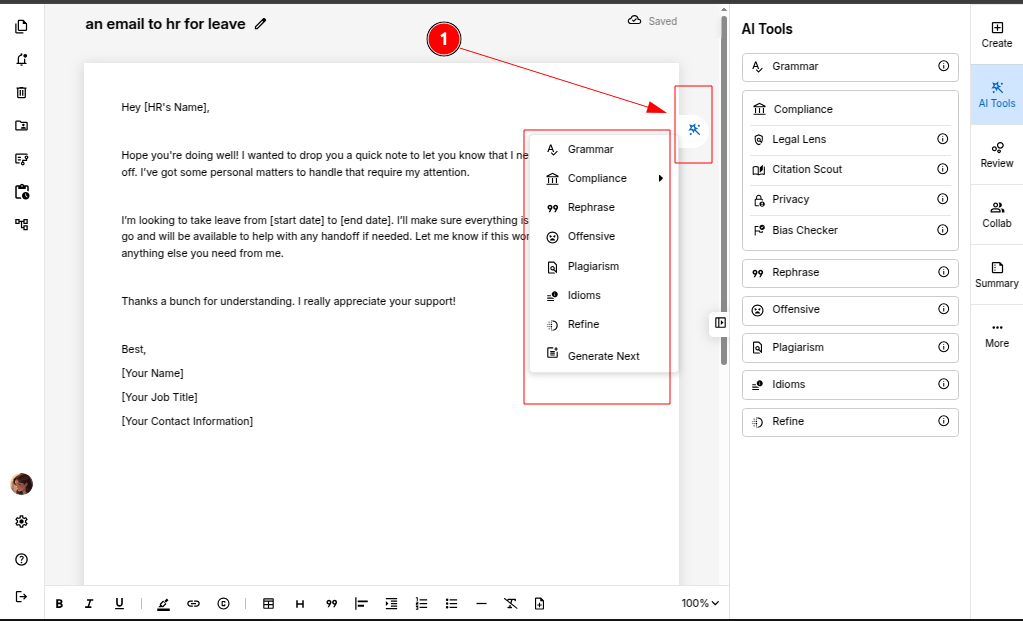
Use the Gear icon for quick modifications with all the essential AI tools in one place.

ProofLex
Open Appi-Resonate Help Center
ProofLex Help
Document Creation
Proofreading
Doc Insights
Team Management / WorkFlows
Microsoft Word Plugin
Microsoft Outlook Plugin
ContentCraft Help
MindWrite Help
What is the purpose of the Gear icon in ProofLex?
The Gear icon in ProofLex acts as a quick-access hub for all essential AI-powered editing and proofreading tools. Each tool serves a unique function to maintain a professional standards effortlessly.
Gear Icon Tools Overview:
1. Grammar
Detects and corrects grammatical errors to ensure your content is linguistically accurate and polished. Click here to learn more.
2. Compliance
The Compliance tool ensures that your content aligns with specific industry or organizational guidelines.
3. Rephrase
This AI tool improves sentence flow by suggesting rephrasing while preserving the original meaning and intent.
4. Offensive
Flags inappropriate and sensitive languages to help maintain a respectful and inclusive tone in the document.
5. Plagiarism
The plagarism tool scans your content against online sources to detect copied or duplicate material, ensuring originality in the context.
6. Refine
Enhances readability by improving sentence structure, tone and overall coherence. Click here to learn more.
7. Generate Next
Uses AI to automatically generate the next paragraph based on the existing context, helping you continue your writing seamlessly.